MySQL
src/main/resources/application.properties
- Host
localhost- Port
3306- Database
shopify_orders_db- Username
shopify_user- Password
changeme
Development credential. Replace it before production.
Project documentation
A reliable webhook pipeline that validates Shopify orders, maps line items, and writes both to your database in one transaction.
How it works
Shopify sends an HTTPS webhook when an order is created. Mule validates the request, transforms the payload, and persists the order with its line items.
The HTTP Listener accepts the Shopify orders/create webhook.
The flow rejects payloads that do not contain both id and email.
DataWeave maps the Shopify payload into order and line-item records.
The database connector upserts the order, obtains its key, then upserts every line item.
Environment snapshot
The local integration stack is active and currently contains one test order with one line item.
| Component | Status | Details |
|---|---|---|
| MySQL | Running | XAMPP MariaDB, PID 5400 |
| Mule App | Running | Anypoint Studio, port 8091 |
| ngrok tunnel | Running | wigglier-rose-nonplussedly.ngrok-free.dev |
| Database contents | 1 order · 1 line item | Current snapshot. Row counts vary across test sessions. |
Runtime reference
Local database, HTTP listener, Shopify webhook, and project-file settings for this integration.
src/main/resources/application.properties
localhost3306shopify_orders_dbshopify_userchangemeDevelopment credential. Replace it before production.
src/main/resources/application.properties
8091Configured manually in Shopify Admin
JSON2026-07 stablehttps://wigglier-rose-nonplussedly.ngrok-free.dev/shopify/ordersFiles used to configure, test, and run the order sync.
sql/shopify_orders_setup.sqlDatabase schemapostman/mulesync-store.postman_collection.jsonManual test requestssrc/main/mule/global.xmlHTTP listener and MySQL connectionsrc/main/mule/mulesync-store.xmlOrder-sync flowIntegration journey
From checkout to a committed MySQL transaction, every order follows the same controlled path.
A customer completes checkout on the connected Shopify store.
The Order creation event sends a JSON POST automatically.
The public URL routes the request to localhost:8091.
/shopify/orders receives itThe Mule listener accepts the POST and begins the order flow.
The payload must contain id and email, otherwise Mule returns 400.
Order and line-item values are normalized into DB-shaped variables.
shopify_orders and shopify_order_items update together without duplicate rows during retries.
Mule returns a JSON confirmation containing the order ID and saved item count.
Webhook endpoint
X-Shopify-Hmac-Sha256X-Shopify-Topicorders/create.X-Shopify-Webhook-Id[[webhooks.subscriptions]]
topics = ["orders/create"]
uri = "https://your-domain.com/shopify/orders"Implementation reference
The current project flow covers validation, mapping, transactional writes, the success response, and global error handling.
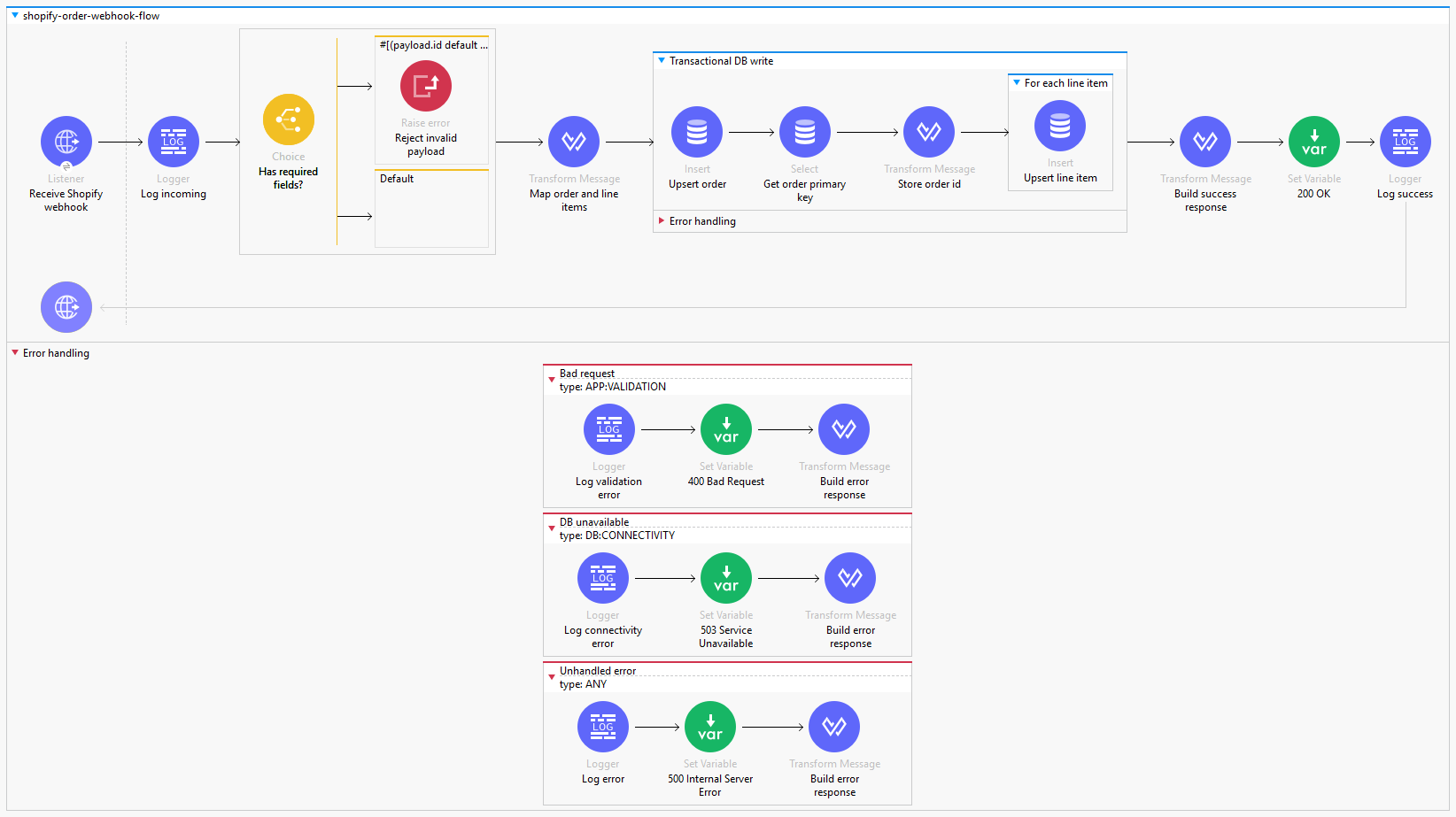
Source walkthrough
These snippets come directly from the XML behind the flow image. Each block shows one job in the order pipeline.
The listener accepts only POST requests at /shopify/orders. Both success and error responses use the status stored in vars.httpStatus.
<http:listener
  config-ref="HTTP_Listener_config"
  path="/shopify/orders"
  allowedMethods="POST"
  doc:name="Receive Shopify webhook">
  <http:response statusCode="#[vars.httpStatus default 200]">
    <http:body>#[payload]</http:body>
  </http:response>
  <http:error-response statusCode="#[vars.httpStatus default 500]">
    <http:body>#[payload]</http:body>
  </http:error-response>
</http:listener>A Choice router checks the minimum payload shape. Missing id or email raises APP:VALIDATION.
<choice doc:name="Has required fields?">
  <when expression="#[(payload.id default null) == null
    or (payload.email default null) == null]">
    <raise-error
      type="APP:VALIDATION"
      description="Webhook payload is missing required fields (id, email)"
      doc:name="Reject invalid payload"/>
  </when>
</choice>DataWeave creates an order object and a clean array of line items. Defaults keep optional Shopify fields from breaking the flow.
%dw 2.0
output application/java
---
{
  shopify_order_id: payload.id,
  customer_email: payload.email
    default (payload.contact_email default ""),
  order_number: ((payload.order_number
    default payload.number) default 0) as Number,
  financial_status: payload.financial_status
    default "pending",
  total_price: (payload.total_price default 0) as Number,
  currency: payload.currency default "USD"
}

(payload.line_items default []) map (item) -> {
  shopify_line_item_id: item.id,
  title: item.title default "Unknown Product",
  quantity: (item.quantity default 1) as Number,
  price: (item.price default 0) as Number
}ALWAYS_BEGIN makes the order and items one database transaction. The upsert handles Shopify retries without creating another order row.
INSERT INTO shopify_orders
  (shopify_order_id, customer_email,
   order_number, total_price, currency)
VALUES
  (:shopify_order_id, :customer_email,
   :order_number, :total_price, :currency)
ON DUPLICATE KEY UPDATE
  id = LAST_INSERT_ID(id),
  customer_email = VALUES(customer_email),
  order_number = VALUES(order_number),
  total_price = VALUES(total_price),
currency = VALUES(currency);The flow returns 200 after a successful write, 400 for invalid data, 503 for database connectivity, and 500 for any other error.
<error-handler>
  <on-error-continue type="APP:VALIDATION">
    <set-variable variableName="httpStatus" value="#[400]"/>
  </on-error-continue>

  <on-error-continue type="DB:CONNECTIVITY">
    <set-variable variableName="httpStatus" value="#[503]"/>
  </on-error-continue>

  <on-error-continue type="ANY">
    <set-variable variableName="httpStatus" value="#[500]"/>
  </on-error-continue>
</error-handler>
Configuration
Install the app on a development store and grant the order scope required by the webhook topic.
Store the Shopify client secret and database credentials in secure configuration properties.
Deploy Mule behind a valid TLS endpoint and use its public URL as the webhook destination.
Register orders/create, send a test delivery, and confirm one order plus all line items are stored.
Operational behavior
| Scenario | Mule error | Response | Action |
|---|---|---|---|
| Missing or invalid fields | APP:VALIDATION | 400 Bad Request | Log the validation failure and return a safe error body. |
| Database unavailable | DB:CONNECTIVITY | 503 Service Unavailable | Roll back the transaction and allow Shopify to retry. |
| Unexpected failure | ANY | 500 Internal Server Error | Log the correlation ID without exposing internals. |
Ready to verify
Use a Shopify development store, create a test order, then verify the Mule logs, HTTP status, order record, and line-item count.